

Sound Synthesis Deep Dive
This document explains how Relanote synthesizes sound using WebAudio, including oscillators, envelopes, filters, and the new multiple oscillator system.
Overview
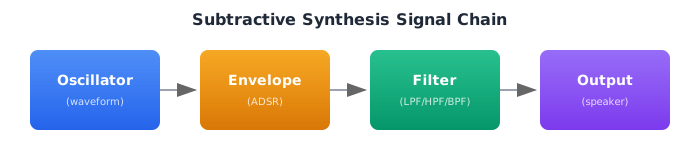
Relanote uses subtractive synthesis, a classic technique that:
- Generates rich waveforms with oscillators
- Shapes the sound over time with envelopes
- Removes harmonics with filters
Oscillators
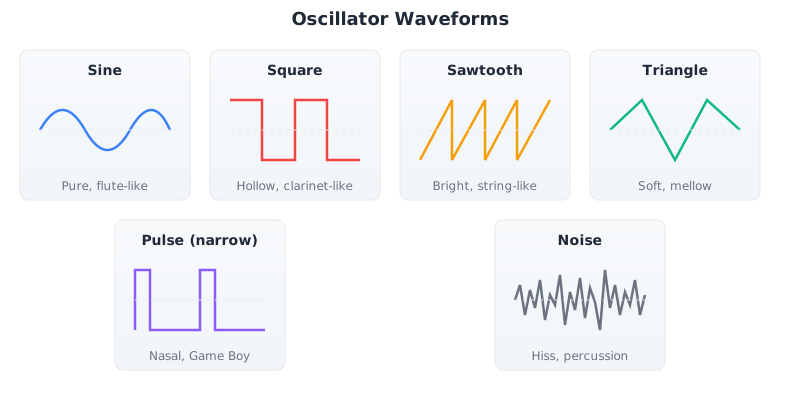
Oscillators generate the raw sound waveform. Each waveform has a unique character:
Waveform Types
Harmonic Content
| Waveform | Harmonics | Character |
|---|---|---|
| Sine | Fundamental only | Pure, flute-like |
| Square | Odd (1, 3, 5, 7...) | Hollow, clarinet-like |
| Sawtooth | All (1, 2, 3, 4...) | Bright, string-like |
| Triangle | Odd (1, 3, 5...) weak | Soft, mellow |
| Noise | All frequencies | Hissing, percussive |
Pulse Width
The Pulse oscillator has variable duty cycle. Narrow pulses sound more nasal and thin - characteristic of Game Boy sounds.
- Pulse 0.5 (= Square) - Standard hollow square wave
- Pulse 0.25 - Narrower, more nasal character
- Pulse 0.125 - Very thin, NES/Game Boy style
ADSR Envelope
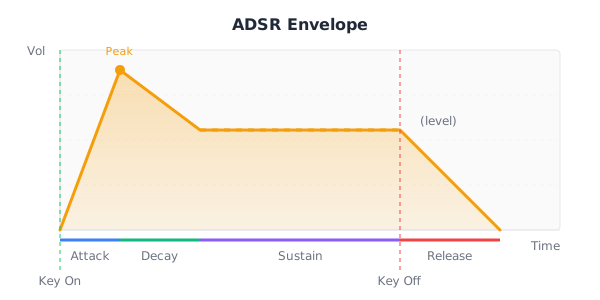
The envelope shapes how a sound evolves over time:
Parameters
| Parameter | Range | Description |
|---|---|---|
| Attack | 0.0 - 10.0 sec | Time to reach peak |
| Decay | 0.0 - 10.0 sec | Time to reach sustain |
| Sustain | 0.0 - 1.0 | Level while key held |
| Release | 0.0 - 10.0 sec | Time to silence after key release |
Envelope Examples
; Piano-like: quick attack, medium decay, some sustain
env: envelope 0.005 0.4 0.3 0.8

; Pad: slow attack, long release
env: envelope 0.8 0.5 0.7 1.5

; Pluck: instant attack, no sustain
env: envelope 0.001 0.3 0.0 0.1

; Organ: instant, full sustain
env: envelope 0.01 0.0 1.0 0.1
Filters
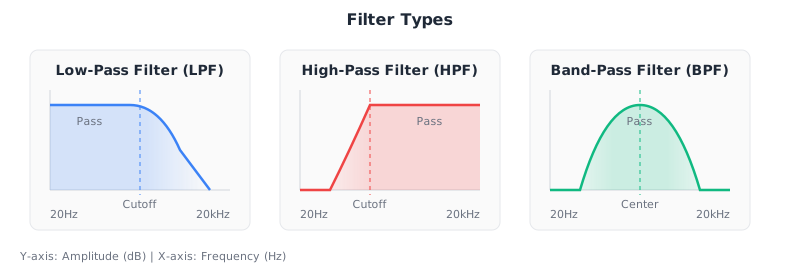
Filters shape the harmonic content by attenuating certain frequencies:
Filter Types
Resonance
Resonance (Q) boosts frequencies near the cutoff, creating a "peak" at the cutoff frequency:
- Low resonance (0.2) - Gentle slope, natural sound
- High resonance (0.8) - Sharp peak at cutoff, more dramatic, "squelchy" sound
Filter in Code
synth Lead = {
  osc: Saw,
  env: envelope 0.02 0.15 0.7 0.2,
  filter: LowPass 3000 0.3   ; cutoff=3000Hz, resonance=0.3
}
Multiple Oscillator Mixing
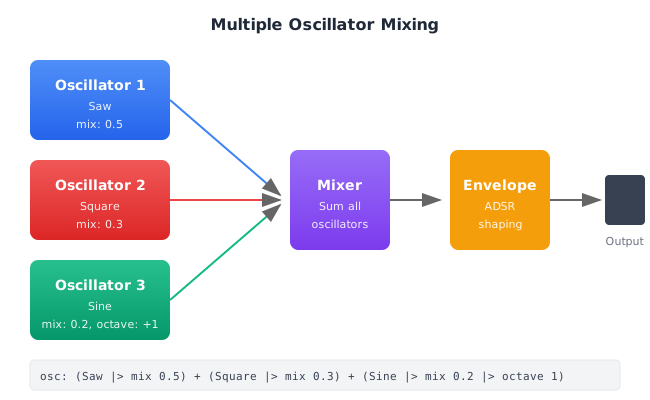
The new oscillator mixing feature allows combining multiple oscillators for richer sounds:
How It Works
Syntax
Use the + operator to combine oscillators with the mix function for level control:
synth MySound = {
  osc: (Saw |> mix 0.5) + (Square |> mix 0.3) + (Sine |> mix 0.2),
  env: envelope 0.01 0.2 0.7 0.3
}
Oscillator Modifiers
| Function | Description | Example |
|---|---|---|
mix level | Set mix level (0.0-1.0) | Saw |> mix 0.5 |
octave offset | Shift by octaves | Sine |> octave 1 |
osc_detune cents | Detune in cents | Saw |> osc_detune 7 |
Detuning for Richness
Slight detuning creates a "chorus" effect - multiple oscillators beating slightly out of tune, creating thickness and movement:
; SuperSaw: 3 detuned sawtooth waves
synth SuperSaw = {
  osc: (Saw |> mix 0.33) +
       (Saw |> mix 0.33 |> osc_detune -12) +
       (Saw |> mix 0.34 |> osc_detune 12),
  env: envelope 0.01 0.2 0.8 0.3,
  filter: LowPass 6000 0.3,
  detune: 7
}- Without detuning: Thin, static sound
- With detuning: Fat, animated, "alive" sound characteristic of trance and EDM
Octave Layering
Adding oscillators at different octaves creates fullness:
; Rhodes-style electric piano
synth Rhodes = {
  osc: (Sine |> mix 0.5) +                    ; Fundamental
       (Triangle |> mix 0.3 |> octave 1) +   ; 1 octave up
       (Sine |> mix 0.2 |> octave 2),        ; 2 octaves up
  env: envelope 0.002 0.8 0.4 0.5,
  filter: LowPass 3000 0.3
}
Pitch Envelope
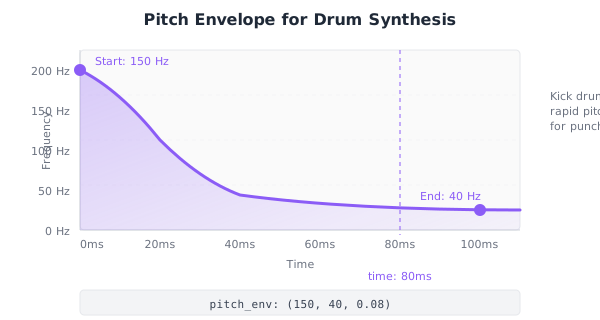
The pitch envelope changes the oscillator frequency over time. Essential for realistic drum sounds:
Syntax
synth DeepKick = {
  osc: Sine,
  env: envelope 0.001 0.15 0.0 0.1,
  pitch_env: (150, 40, 0.08)  ; start_hz, end_hz, time_seconds
}
How It Creates Punch
Real kick drums have a rapid pitch drop. The beater hits the drum head at high frequency, then quickly settles to the fundamental. This creates the characteristic "punch" or "thump" of a kick drum. The pitch envelope in Relanote simulates this physical behavior.
Examples
; Deep kick - slow pitch drop, sub-heavy
synth DeepKick = {
  osc: Sine,
  env: envelope 0.001 0.15 0.0 0.1,
  pitch_env: (150, 40, 0.08)
}

; Punchy kick - fast pitch drop, more attack
synth PunchyKick = {
  osc: (Sine |> mix 0.7) + (Triangle |> mix 0.3),
  env: envelope 0.001 0.12 0.0 0.08,
  pitch_env: (200, 50, 0.05)
}

; Tom with pitch envelope
synth HighTom = {
  osc: (Sine |> mix 0.6) + (Triangle |> mix 0.4),
  env: envelope 0.001 0.2 0.0 0.15,
  pitch_env: (400, 200, 0.06)
}
WebAudio Implementation
Here's how the synth is implemented in WebAudio:
function noteOn(pitch, synth, startTime, duration) {
  const osc = audioContext.createOscillator();
  const gain = audioContext.createGain();
  const filter = audioContext.createBiquadFilter();

  // Set oscillator type
  osc.type = synth.oscillators[0].osc_type; // 'sine', 'square', etc.
  osc.frequency.value = midiToFrequency(pitch);

  // Apply pitch envelope if present
  if (synth.pitch_envelope) {
    const { start_hz, end_hz, time_seconds } = synth.pitch_envelope;
    osc.frequency.setValueAtTime(start_hz, startTime);
    osc.frequency.exponentialRampToValueAtTime(end_hz, startTime + time_seconds);
  }

  // Setup ADSR envelope
  const { attack, decay, sustain, release } = synth.envelope;
  gain.gain.setValueAtTime(0, startTime);
  gain.gain.linearRampToValueAtTime(1, startTime + attack);
  gain.gain.linearRampToValueAtTime(sustain, startTime + attack + decay);
  gain.gain.setValueAtTime(sustain, startTime + duration);
  gain.gain.linearRampToValueAtTime(0, startTime + duration + release);

  // Setup filter
  filter.type = synth.filter.filter_type; // 'lowpass', 'highpass', 'bandpass'
  filter.frequency.value = synth.filter.cutoff;
  filter.Q.value = synth.filter.resonance * 20;

  // Connect: osc → gain → filter → output
  osc.connect(gain);
  gain.connect(filter);
  filter.connect(audioContext.destination);

  osc.start(startTime);
  osc.stop(startTime + duration + release);
}
Practical Sound Design Tips
Piano Sounds
- Use Sine + Triangle harmonics
- Quick attack (< 10ms), medium decay
- Low resonance filter
Bass Sounds
- Saw or Square base
- Low filter cutoff (200-800Hz)
- Moderate resonance for growl
- Optional: add sub-octave Sine
Lead Sounds
- Saw or detuned oscillators
- Medium-high filter cutoff
- Higher resonance for bite
- Fast attack for articulation
Pad Sounds
- Slow attack (0.5-1.0s)
- Long release
- Detune for movement
- Low resonance
Drum Sounds
- Sine/Triangle for tonal drums
- Noise for hi-hats/cymbals
- Pitch envelope for punch
- Very fast attack, no sustain