

Synthesizer Fundamentals
This document explains the core concepts of sound synthesis used in Relanote.
What is a Synthesizer?
A synthesizer is an electronic instrument that generates sound from scratch using electrical signals. Unlike acoustic instruments that produce sound through physical vibration, synthesizers create sound mathematically.

The Physics of Sound
Sound Waves
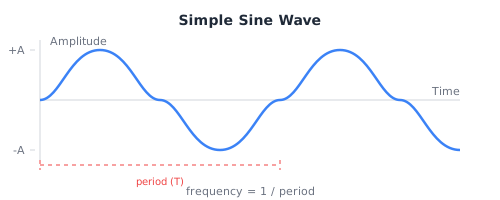
Sound is a pressure wave traveling through air. We perceive:
- Frequency (pitch): How fast the wave oscillates (Hz = cycles per second)
- Amplitude (volume): How much pressure change
- Timbre (tone color): The wave's shape
Harmonics and Timbre
Real sounds contain multiple frequencies called harmonics or overtones:
Harmonic series for a 100 Hz fundamental:
| Harmonic | Frequency | Interval from Fundamental |
|---|---|---|
| 1st | 100 Hz | Fundamental (root) |
| 2nd | 200 Hz | Octave (P8) |
| 3rd | 300 Hz | Octave + Fifth (P8 + P5) |
| 4th | 400 Hz | Two octaves (P15) |
| 5th | 500 Hz | Two octaves + Major 3rd |
| 6th | 600 Hz | Two octaves + Fifth |
| 7th | 700 Hz | Slightly flat minor 7th |
| 8th | 800 Hz | Three octaves |
| ... | ... | ... |
The relative strength of these harmonics determines timbre - why a piano sounds different from a violin playing the same note.
Oscillators
What is an Oscillator?
An oscillator generates a repeating waveform at a specific frequency. It's the sound source - the starting point of synthesis.
Waveform Types
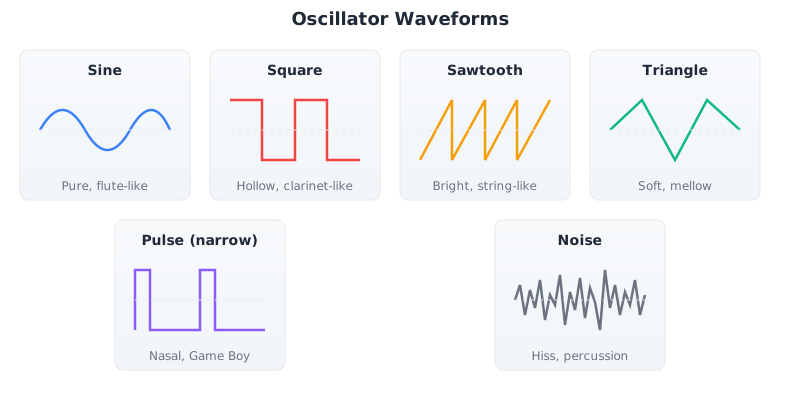
Each waveform has unique characteristics:
| Waveform | Harmonics | Sound | Example Use |
|---|---|---|---|
| Sine | Fundamental only | Pure, flute-like | Sub-bass, pure tones |
| Square | Odd (1, 3, 5...) | Hollow, clarinet-like | Video games, leads |
| Sawtooth | All (1, 2, 3...) | Bright, brassy | Strings, brass, leads |
| Triangle | Odd (weak) | Soft, mellow | Woodwinds, flutes |
| Pulse | Variable | Nasal, thin | 8-bit, chiptune |
| Noise | All (random) | Hiss, breath | Hi-hats, percussion |
; Different oscillator examples
synth PureTone = { osc: Sine, env: envelope 0.01 0.1 0.8 0.3 }
synth Clarinet = { osc: Square, env: envelope 0.08 0.2 0.7 0.2, filter: LowPass 2000 0.3 }
synth BrightLead = { osc: Saw, env: envelope 0.01 0.15 0.7 0.2, filter: LowPass 4000 0.5 }
synth GameBoy = { osc: Pulse 0.125, env: envelope 0.001 0.1 0.5 0.1 }
synth HiHat = { osc: Noise, env: envelope 0.001 0.05 0.0 0.05, filter: HighPass 8000 0.5 }
Combining Oscillators
Relanote allows mixing multiple oscillators for richer sounds:
synth RichPad = {
  osc: (Saw |> mix 0.4) +
       (Square |> mix 0.3) +
       (Sine |> mix 0.3 |> octave -1),
  env: envelope 0.5 0.3 0.7 1.0,
  filter: LowPass 3000 0.2
}
Detuning
Slightly detuning oscillators creates a thick, chorusing effect:
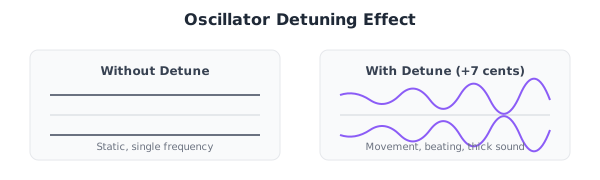
synth SuperSaw = {
  osc: (Saw |> mix 0.33) +
       (Saw |> mix 0.33 |> osc_detune -12) +
       (Saw |> mix 0.34 |> osc_detune 12),
  env: envelope 0.01 0.2 0.8 0.3,
  detune: 7
}
Envelopes
What is an Envelope?
An envelope shapes how a parameter changes over time. The most common is the amplitude envelope (ADSR), which controls volume.
ADSR Envelope
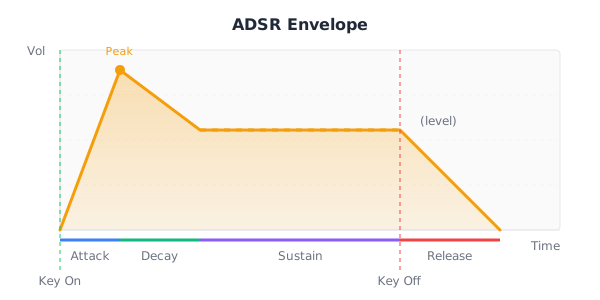
Parameter Ranges
| Parameter | Range | Description |
|---|---|---|
| Attack | 0 - 10 sec | Time to reach peak |
| Decay | 0 - 10 sec | Time to reach sustain |
| Sustain | 0 - 1.0 | Level (not time!) |
| Release | 0 - 10 sec | Time to silence |
Envelope Shapes for Different Sounds
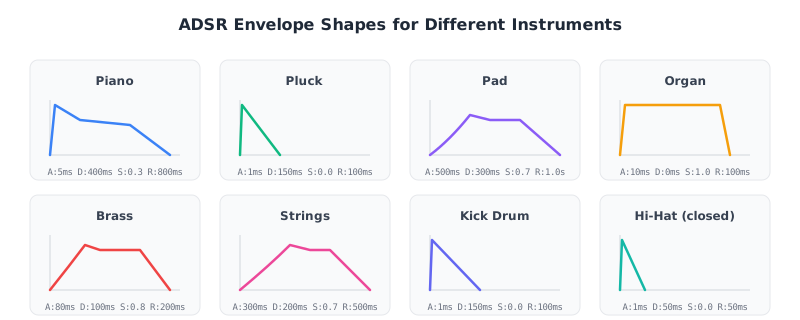
; Piano-style
synth Piano = {
  osc: (Sine |> mix 0.6) + (Triangle |> mix 0.4),
  env: envelope 0.005 0.4 0.3 0.8
}

; Pluck-style
synth Pluck = {
  osc: Saw,
  env: envelope 0.001 0.15 0.0 0.1
}

; Pad-style
synth Pad = {
  osc: (Saw |> mix 0.5) + (Square |> mix 0.5),
  env: envelope 0.5 0.3 0.7 1.0,
  filter: LowPass 2000 0.2
}

; Organ-style
synth Organ = {
  osc: (Sine |> mix 0.5) + (Sine |> mix 0.3 |> octave 1) + (Sine |> mix 0.2 |> octave 2),
  env: envelope 0.01 0.0 1.0 0.1
}
Pitch Envelope
A pitch envelope changes frequency over time. Essential for drum synthesis:
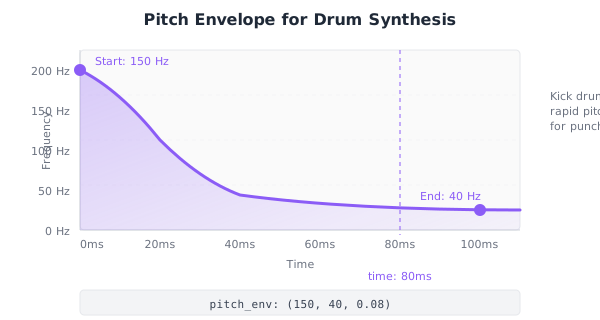
synth Kick = {
  osc: Sine,
  env: envelope 0.001 0.15 0.0 0.1,
  pitch_env: (150, 40, 0.08)  ; start, end, time
}
Filters
What is a Filter?
A filter removes or reduces certain frequencies from a sound. Filters are essential for shaping timbre.
Filter Types
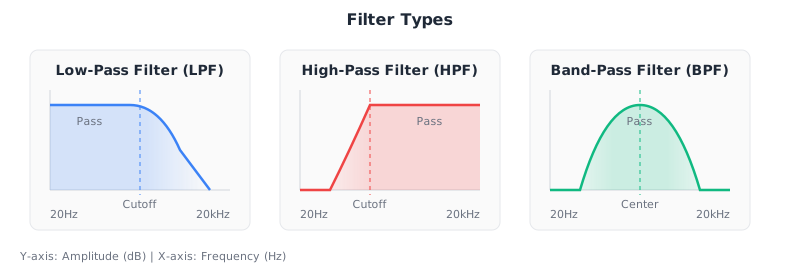
Low-Pass Filter (LPF)
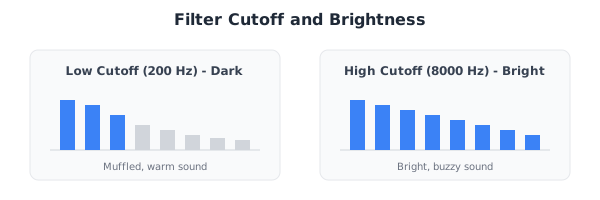
Passes frequencies below the cutoff, removes frequencies above. This is the most common filter in synthesis - it creates darker, warmer sounds from bright sources.
synth WarmBass = {
  osc: Saw,
  env: envelope 0.01 0.1 0.6 0.2,
  filter: LowPass 400 0.4
}
High-Pass Filter (HPF)
Passes frequencies above the cutoff, removes frequencies below. Used for hi-hats and removing bass from instruments.
synth HiHat = {
  osc: Noise,
  env: envelope 0.001 0.05 0.0 0.05,
  filter: HighPass 8000 0.5
}
Band-Pass Filter (BPF)
Passes frequencies around the center frequency, removes both above and below. Creates "telephone" or "radio" effects.
Resonance (Q)
Resonance boosts frequencies near the cutoff:
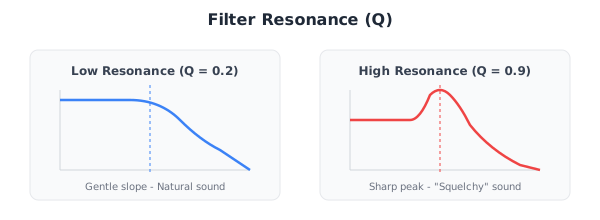
; Low resonance - natural
synth Natural = {
  osc: Saw,
  filter: LowPass 2000 0.2
}

; High resonance - squelchy acid bass
synth Acid = {
  osc: Saw,
  filter: LowPass 800 0.8,
  env: envelope 0.001 0.1 0.4 0.1
}
Filter Cutoff and Brightness
Modulation
What is Modulation?
Modulation means using one signal to control another. It creates movement and interest in sounds.
LFO (Low Frequency Oscillator)
An oscillator running at sub-audio rates (0.1 - 20 Hz) to modulate parameters:
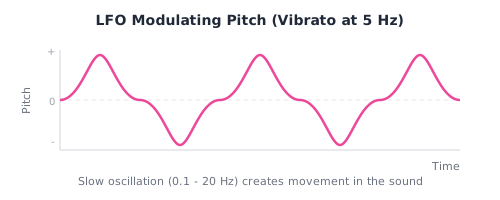
Common LFO destinations:
- Pitch → Vibrato
- Filter cutoff → Wah effect
- Amplitude → Tremolo
- Pan → Auto-pan
Velocity
MIDI velocity (how hard you hit a key) can modulate:
- Volume (louder with harder hits)
- Filter cutoff (brighter with harder hits)
- Attack time (faster attack with harder hits)
Practical Sound Design
Bass Sounds
; Sub bass - pure low end
synth SubBass = {
  osc: Sine,
  env: envelope 0.01 0.1 0.8 0.2,
  filter: LowPass 200 0.2
}

; Synth bass - fuller
synth SynthBass = {
  osc: (Saw |> mix 0.6) + (Square |> mix 0.4),
  env: envelope 0.01 0.15 0.5 0.15,
  filter: LowPass 600 0.5
}

; Acid bass - squelchy
synth AcidBass = {
  osc: Saw,
  env: envelope 0.001 0.1 0.3 0.1,
  filter: LowPass 400 0.85
}
Lead Sounds
; Classic lead
synth Lead = {
  osc: Saw,
  env: envelope 0.01 0.1 0.7 0.2,
  filter: LowPass 4000 0.4,
  detune: 5
}

; Supersaw lead (trance)
synth SuperSaw = {
  osc: (Saw |> mix 0.33) +
       (Saw |> mix 0.33 |> osc_detune -12) +
       (Saw |> mix 0.34 |> osc_detune 12),
  env: envelope 0.01 0.2 0.8 0.3,
  filter: LowPass 6000 0.3,
  detune: 7
}
Pad Sounds
; Warm pad
synth WarmPad = {
  osc: (Saw |> mix 0.4) + (Triangle |> mix 0.6),
  env: envelope 0.8 0.4 0.6 1.5,
  filter: LowPass 2500 0.2,
  detune: 8
}

; String pad
synth StringPad = {
  osc: (Saw |> mix 0.5) + (Saw |> mix 0.5 |> osc_detune 5),
  env: envelope 0.4 0.3 0.7 1.0,
  filter: LowPass 4000 0.3
}
Drum Sounds
; Kick drum - pitch envelope is key
synth Kick = {
  osc: Sine,
  env: envelope 0.001 0.15 0.0 0.1,
  pitch_env: (150, 40, 0.08)
}

; Snare - noise + tone
synth Snare = {
  osc: (Triangle |> mix 0.4) + (Noise |> mix 0.6),
  env: envelope 0.001 0.1 0.0 0.1,
  filter: HighPass 200 0.3
}

; Hi-hat - filtered noise
synth HiHat = {
  osc: Noise,
  env: envelope 0.001 0.05 0.0 0.05,
  filter: HighPass 8000 0.6
}
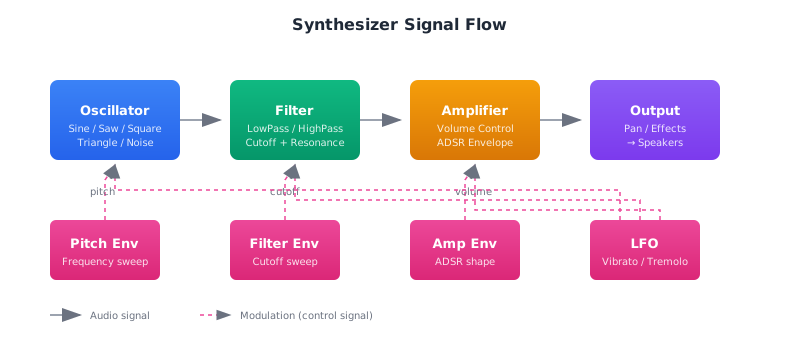
Summary
Further Reading
- Sound Synthesis: Detailed WebAudio implementation
- Preset Reference: Complete list of built-in presets
- Music Theory: The musical concepts behind synthesis